
WC777 Deposit and Withdraw – Easy Transaction Guide
Managing your balance should not feel difficult. WC777 Game provides deposit and withdrawal options so users can add funds and request withdrawals from their accounts. The process is designed to be simple, but it is still important to check every payment detail before confirming a transaction.
This guide explains how the WC777 Deposit and Withdraw process works in clear steps. New users can use these instructions to understand where to find the payment options and what to check before completing a transaction.
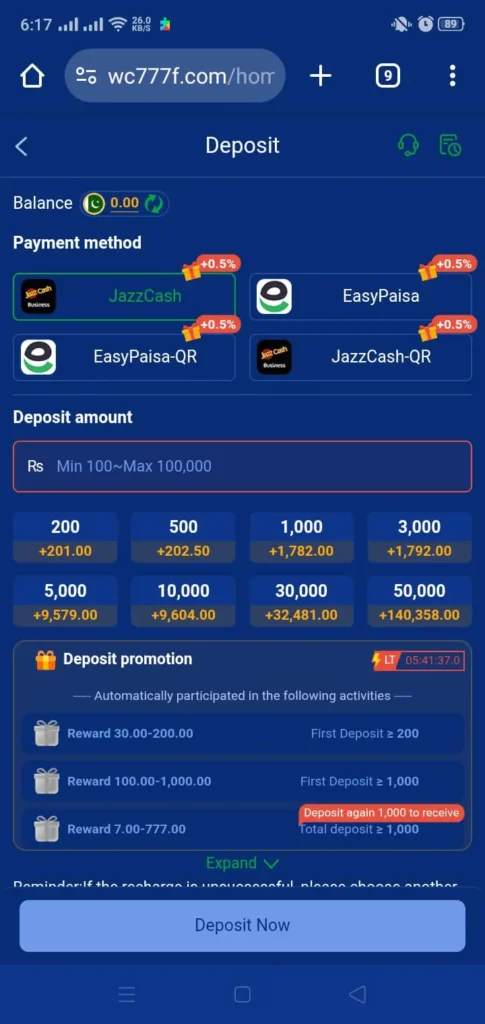
Add Balance to Your WC777 Account
Before using any balance-based game, you may need to add funds to your WC777 account. Open your account, visit the payment section, and choose one of the methods currently available to you.
Enter the required amount and carefully follow the instructions provided on the screen. Once the payment has been completed, check your account balance to confirm that the funds have been added.
Steps to Make a WC777 Deposit
- Sign in to your WC777 Download.
- Open the Deposit or Recharge section.
- Select a payment method available in your account.
- Enter the amount you want to deposit.
- Check the payment details carefully.
- Complete the payment using the instructions provided.
- Return to your account and check the updated balance.
Always make sure that the WC777 Deposit and Withdraw information belongs to the correct account before confirming your transaction.
Request a Withdrawal from WC777
When you have a balance available for withdrawal, you can open the withdrawal section of your account and submit a request. The available withdrawal methods (EasyPaisa or JazzCash) and any account requirements can depend on the platform and your account status.
It is important to enter correct payment details because incorrect information can delay or prevent a successful withdrawal.
Steps to Withdraw Your WC777 Balance
- Log in to your WC777 account.
- Go to the Withdraw or Cash Out section.
- Select an available withdrawal method.
- Enter the amount you want to withdraw.
- Add or select your correct payment details.
- Review all information before submitting.
- Confirm the withdrawal request.
After sending the request, keep your transaction details until the withdrawal has been processed.
Keep WC777 Deposit and Withdraw Information Correct
One small mistake in a payment account number or wallet detail can create problems. Before making a WC777 Deposit and Withdraw, take a moment to check the name, account number, amount, and other required information.
Never give your password, OTP, PIN, or other private security information to another person claiming to be from support.
What to Do If a Payment Is Delayed
A deposit or withdrawal may sometimes take additional time because of payment processing, account verification, or other requirements. If your balance has not changed, avoid making the same payment repeatedly.
First, check your transaction history and payment status. If the issue continues, contact the official Wc777gameapp.pk support channel and provide the relevant transaction information.
Make Every WC777 Deposit and Withdraw Carefully
Good payment habits can help you avoid unnecessary problems. Use your own payment account, double-check the amount before confirming, and keep a record of important transactions.
You should also read the current payment instructions shown inside your WC 777 account because available methods, limits, and processing requirements may change.
Responsible Gaming Comes First
Depositing money should always be done with care. Only use an amount that you can afford to lose and set a personal spending limit before playing. Do not try to recover losses by depositing more money.
Gaming should be treated as entertainment, not as a guaranteed source of income.
A Simple Way to Manage Your WC777 Balance
The WC777 Deposit and Withdraw process can be easy when you follow the instructions carefully. For deposits, choose the available payment method, enter the amount, complete the payment, and check your balance. For withdrawals, enter your correct payment details and review the request before confirming it.
Keeping your account information secure and checking every transaction can make the overall experience smoother and safer.